新建

列表

查看处理

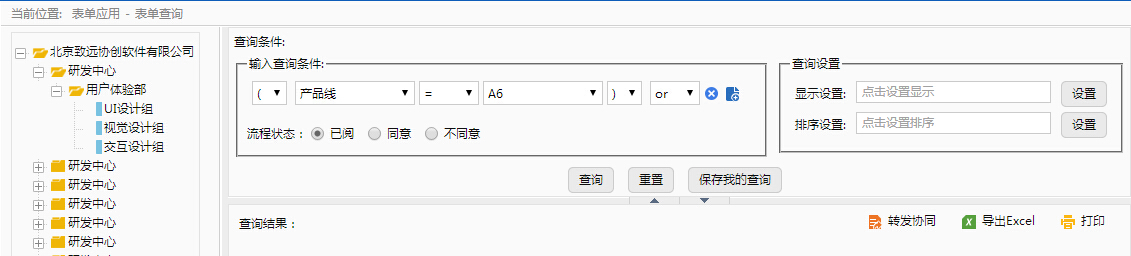
弹出框类型页面模板
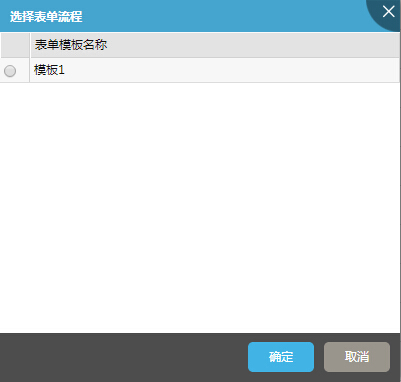
                            <body>
                                <table class="only_table edit_table no_border" border="0" cellspacing="0" cellpadding="0" width="100%">
                                    <thead>
                                        <tr>
                                            <th width="20"> </th>
                                            <th>表单模板名称</th>
                                        </tr>
                                    </thead>
                                    <tbody>
                                        <tr class="erow">
                                            <td><input type="radio"/></td>
                                            <td>模板1</td>
                                        </tr>
                                    </tbody>
                                </table>
                            </body>
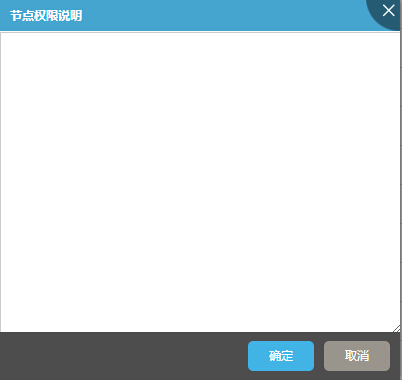
                            <body class="h100b over_hidden">
                                <textarea class="w100b h100b">

                                </textarea>
                            </body>
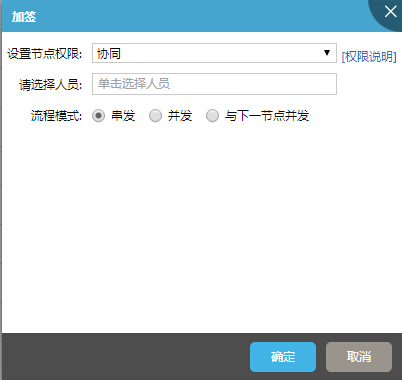
                            <body class="h100b">
                                <div class="form_area padding_5">
                                    <table border="0" cellSpacing="0" cellPadding="0" width="100%">
                                      <tbody><tr>
                                        <th noWrap="nowrap"><label class="margin_r_10" for="text">设置节点权限:</label></th>
                                        <td width="100%"><div class="common_selectbox_wrap"><select><option>协同</option></select></div></td>
                                        <td nowrap="nowrap" rowspan="3" valign="top"><a href="javascript:void(0)" class="display_inline-block margin_t_10"> [权限说明]</a></td>
                                      </tr>
                                      <tr>
                                        <th noWrap="nowrap"><label class="margin_r_10" for="text">请选择人员:</label></th>
                                        <td ><div class="common_txtbox_wrap"><input id="select_people"  type="text"></div></td>
                                      </tr>
                                      <tr>
                                        <th noWrap="nowrap"><label class="margin_r_10" for="text">流程模式:</label></th>
                                        <td>
                                            <div class="common_radio_box clearfix">
                                                <label class="margin_r_10 hand" for="radio1"><input id="radio11" checked="checked" class="radio_com" name="option" value="0" type="radio">串发</label>
                                                <label class="margin_r_10 hand" for="radio2"><input id="radio12" class="radio_com" name="option" value="0" type="radio">并发</label>
                                                <label class="margin_r_10 hand" for="radio3"><input id="radio13" class="radio_com" name="option" value="0" type="radio">与下一节点并发</label>
                                            </div>
                                        </td>
                                      </tr></tbody>
                                    </table>
                                </div>

                            </body>
                            <script type="text/javascript">
                                 $(function(){
                                    new inputChange($("#select_people"),"单击选择人员");
                                 })
                            </script>
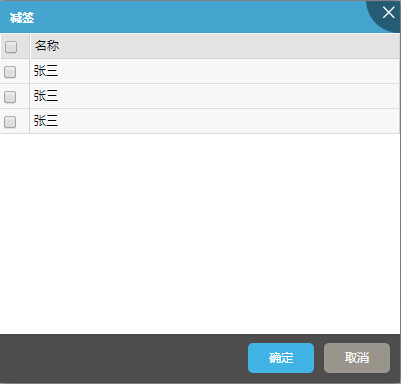
                            <body class="h100b">
                                <table class="only_table edit_table no_border" border="0" cellspacing="0" cellpadding="0" width="100%">
                                    <thead>
                                        <tr>
                                            <th width="20"><input type="checkbox"/></th>
                                            <th>名称</th>
                                        </tr>
                                    </thead>
                                    <tbody>
                                        <tr class="erow">
                                            <td><input type="checkbox"/></td>
                                            <td>张三</td>
                                        </tr>
                                        <tr class="erow">
                                            <td><input type="checkbox"/></td>
                                            <td>张三</td>
                                        </tr>
                                        <tr class="erow">
                                            <td><input type="checkbox"/></td>
                                            <td>张三</td>
                                        </tr>
                                    </tbody>
                                </table>

                            </body>
                            <script type="text/javascript">
                                 $(function(){
                                    new inputChange($("#select_people"),"单击选择人员");
                                 })
                            </script>
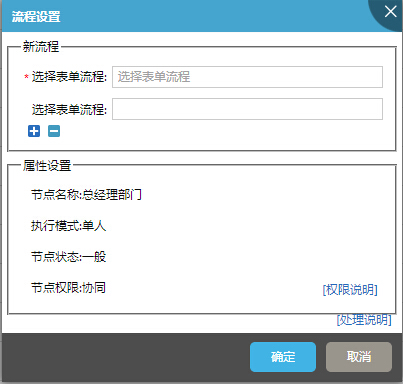
                            <body>
                                <fieldset class="margin_5">
                                    <legend>新流程</legend>
                                    <div class="form_area align_center relative padding_b_15">
                                        <table border="0" cellspacing="0" cellpadding="0" width="100%" align="center">
                                            <tr>
                                                <th nowrap="nowrap"><label class="margin_r_5" for="text"><span class="required">*</span>选择表单流程:</label></th>
                                                <td width="100%"><div class="common_txtbox_wrap">
                                                    <input id="newflow" type="text" name="newflow" />
                                                </div></td>
                                            </tr>
                                            <tr>
                                                <th nowrap="nowrap"><label class="margin_r_5" for="text">选择表单流程:</label></th>
                                                <td width="100%"><div class="common_txtbox_wrap">
                                                    <input id="newflow" type="text" name="newflow" />
                                                </div></td>
                                            </tr>
                                         </table>
                                         <div class="fieldset_edit absolute">
                                            <span class="ico16 repeater_plus_16 add" ></span>
                                            <span class="ico16 repeater_reduce_16 remove"></span>
                                        </div>
                                    </div>
                                    <div class="form_area align_center border_t margin_t_5 padding_t_5 newItem hidden padding_b_15 relative">
                                        <div class="fieldset_edit absolute">
                                            <span class="ico16 repeater_plus_16 add" ></span>
                                            <span class="ico16 repeater_reduce_16 remove"></span>
                                        </div>
                                        <table border="0" cellspacing="0" cellpadding="0" width="100%" align="center">
                                            <tr>
                                                <th nowrap="nowrap"><label class="margin_r_5" for="text"><span class="required">*</span>选择表单流程:</label></th>
                                                <td width="100%"><div class="common_txtbox_wrap">
                                                    <input id="newflow" type="text" name="newflow" />
                                                </div></td>
                                            </tr>
                                            <tr>
                                                <th nowrap="nowrap"><label class="margin_r_5" for="text">选择表单流程:</label></th>
                                                <td width="100%"><div class="common_txtbox_wrap">
                                                    <input id="newflow" type="text" name="newflow" />
                                                </div></td>
                                            </tr>
                                         </table>
                                    </div>
                                </fieldset>

                                <fieldset class="margin_5">
                                    <legend>属性设置</legend>
                                    <div class="form_area relative margin_l_10">
                                        <table border="0" cellspacing="0" cellpadding="0" width="100%">
                                            <tr>
                                                <th nowrap="nowrap"><label for="text">节点名称:</label></th>
                                                <td width="100%">总经理部门</td>
                                            </tr>
                                            <tr>
                                                <th nowrap="nowrap"><label for="text">执行模式:</label></th>
                                                <td width="100%">单人</td>
                                            </tr>
                                            <tr>
                                                <th nowrap="nowrap"><label for="text">节点状态:</label></th>
                                                <td width="100%">一般</td>
                                            </tr>
                                            <tr>
                                                <th nowrap="nowrap"><label for="text">节点权限:</label></th>
                                                <td width="100%">协同</td>
                                            </tr>
                                         </table>
                                            <a href="javascript:void(0)" class="absolute" style="bottom:5px;right:5px;">[权限说明]</a>
                                    </div>
                                </fieldset>
                                    <a href="javascript:void(0)" class="absolute font_size12" style="bottom:5px;right:10px;">[处理说明]</a>
                            </body>
                            <script type="text/javascript">
                                 $(function(){
                                    new inputChange($("#newflow"),"选择表单流程");
                                    //添加项
                                    $(".add").click(function(){
                                        var newItem=$(".newItem").eq(0).clone(true).removeClass("hidden");
                                        $(".newItem").eq(0).parent().append(newItem);
                                    });
                                    //删除项
                                    $(".remove").click(function(){
                                        var removeItem=$(".newItem").length;
                                        if(removeItem!=1) $(".newItem").eq(removeItem-1).remove();
                                    });

                                 })
                            </script>
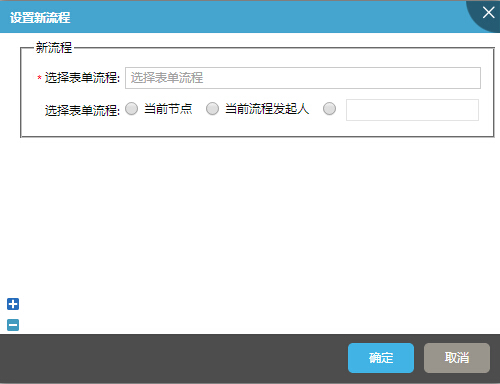
                            <body>
                                <fieldset class="margin_5 margin_l_20">
                                    <legend>新流程</legend>
                                    <div class="form_area align_center relative">
                                        <table border="0" cellspacing="0" cellpadding="0" width="100%" align="center">
                                            <tr>
                                                <th nowrap="nowrap"><label class="margin_r_5" for="text"><span class="required">*</span>选择表单流程:</label></th>
                                                <td width="100%"><div class="common_txtbox_wrap">
                                                    <input id="newflow" type="text" name="newflow" />
                                                </div></td>
                                            </tr>
                                            <tr>
                                                <th nowrap="nowrap"><label class="margin_r_5" for="text">选择表单流程:</label></th>
                                                <td width="100%" align="left">
                                                    <div class="common_radio_box clearfix">
                                                        <label class="margin_r_10 hand" for="radio1">
                                                            <input id="radio1" class="radio_com" name="option" value="0" type="radio">当前节点
                                                        </label>
                                                        <label class="margin_r_10 hand" for="radio2">
                                                            <input id="radio2" class="radio_com" name="option" value="0" type="radio">当前流程发起人
                                                        </label>
                                                        <label class=" hand" >
                                                            <input id="radio3" class="radio_com" name="option" value="0" type="radio">
                                                        </label>
                                                        <input type="text" name="newflow" />
                                                </div>
                                            </td>
                                            </tr>
                                         </table>
                                    </div>
                                </fieldset>
                                <fieldset class="margin_5 hidden newItem margin_l_20">
                                    <legend>新流程</legend>
                                    <div class="form_area align_center">
                                        <table border="0" cellspacing="0" cellpadding="0" width="100%" align="center">
                                            <tr>
                                                <th nowrap="nowrap"><label class="margin_r_5" for="text"><span class="required">*</span>选择表单流程:</label></th>
                                                <td width="100%"><div class="common_txtbox_wrap">
                                                    <input id="newflow" type="text" name="newflow" />
                                                </div></td>
                                            </tr>
                                            <tr>
                                                <th nowrap="nowrap"><label class="margin_r_5" for="text">选择表单流程:</label></th>
                                                <td width="100%"><div class="common_txtbox_wrap">
                                                    <input id="newflow" type="text" name="newflow" />
                                                </div></td>
                                            </tr>
                                         </table>
                                    </div>
                                </fieldset>
                                <div class="fieldset_edit fixed" style="position:fixed">
                                    <span class="ico16 repeater_plus_16 add" ></span><br>
                                    <span class="ico16 repeater_reduce_16 remove"></span>
                                </div>
                            </body>
                            <script type="text/javascript">
                                 $(function(){
                                    new inputChange($("#newflow"),"选择表单流程");
                                    //添加项
                                    $(".add").click(function(){
                                        var newItem=$(".newItem").eq(0).clone(true).removeClass("hidden");
                                        $(".fieldset_edit").eq(0).before(newItem);
                                    });
                                    //删除项
                                    $(".remove").click(function(){
                                        var removeItem=$(".newItem").length;
                                        if(removeItem!=1) $(".newItem").eq(removeItem-1).remove();
                                    });

                                 })
                            </script>
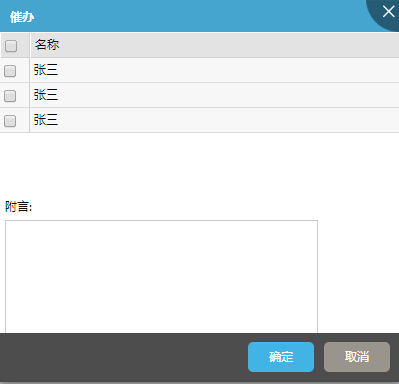
                            <style>
                                .stadic_bottom_height{
                                    height:140px;
                                    bottom:0;
                                }
                                .stadic_body_top_bottom{
                                    bottom:140px;
                                    top:0px;
                                }
                            </style>
                            <body class="h100b over_hidden">
                                <div class="stadic_layout">
                                        <div class=" stadic_layout_body stadic_body_top_bottom ">
                                            <table class="only_table edit_table no_border" border="0" cellspacing="0"  cellpadding="0" width="100%">
                                                <thead>
                                                    <tr>
                                                        <th width="20"><input type="checkbox"/></th>
                                                        <th>名称</th>
                                                    </tr>
                                                </thead>
                                                <tbody>
                                                    <tr class="erow">
                                                        <td><input type="checkbox"/></td>
                                                        <td>张三</td>
                                                    </tr>
                                                    <tr class="erow">
                                                        <td><input type="checkbox"/></td>
                                                        <td>张三</td>
                                                    </tr>
                                                    <tr class="erow">
                                                        <td><input type="checkbox"/></td>
                                                        <td>张三</td>
                                                    </tr>
                                                </tbody>
                                            </table>
                                        </div>
                                        <div class="stadic_layout_head stadic_bottom_height absolute">
                                            <div class="font_size12 margin_5">附言:</div>
                                            <textarea rows="8" cols="49" class="margin_l_5" > </textarea>
                                        </div>
                                    </div>
                                </body>
                            <script type="text/javascript">
                                $(function(){
                                    new inputChange($("#select_people"),"单击选择人员");
                                 })
                            </script>
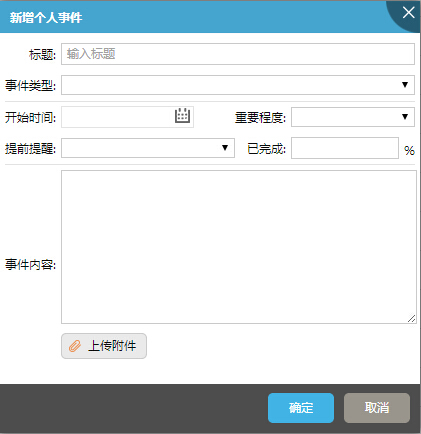
                            <body>
                                <div class="form_area  margin_5">
                                    <table border="0" cellspacing="0" cellpadding="0" width="100%" align="center">
                                        <tr>
                                            <th nowrap="nowrap"><label class="margin_r_5" for="text">标题:</label></th>
                                            <td width="100%" colspan="3"><div class="common_txtbox_wrap">
                                                <input id="newflow" type="text" name="newflow" />
                                            </div></td>
                                        </tr>
                                         <tr>
                                            <th nowrap="nowrap" class="border_b"><label class="margin_r_5" for="text">事件类型:</label></th>
                                            <td width="100%" colspan="3" class="border_b"><div class="common_selectbox_wrap">
                                                    <select><option> </option></select>
                                            </div></td>
                                        </tr>
                                        <tr>
                                            <th nowrap="nowrap"><label class="margin_r_5" for="text">开始时间:</label></th>
                                            <td width="50%"><input id="mycal2" type="text" class="comp" comp="type:'calendar',ifFormat:'%Y-%m-%d'"></td>
                                            <th nowrap="nowrap"><label class="margin_r_5" for="text">重要程度:</label></th>
                                            <td width="50%"><div class="common_selectbox_wrap">
                                                    <select><option> </option></select>
                                            </div></td>
                                        </tr>
                                        <tr>
                                            <th nowrap="nowrap"><label class="margin_r_5" for="text">提前提醒:</label></th>
                                            <td width="50%"><div class="common_selectbox_wrap">
                                                    <select><option> </option></select>
                                            </div></td>
                                            <th nowrap="nowrap"><label class="margin_r_5" for="text">已完成:</label></th>
                                            <td width="50%"><label class="right valign_m margin_t_5 margin_l_5">%</label><div class="common_txtbox_wrap">
                                                <input id="newflow" type="text" name="newflow" />
                                            </div></td>
                                        </tr>
                                        <tr>
                                            <th nowrap="nowrap" class="border_t padding_t_5"><label class="margin_r_5" for="text">事件内容:</label></th>
                                            <td colspan="3" class="border_t padding_t_5" align="left"><div class="common_txtbox">
                                                <textarea class="w100b" rows="8"></textarea>
                                                <a class="common_button common_button_icon margin_t_5" href="javascript:void(0)"><em class="ico16 affix_16"></em>上传附件</a></div>

                                            </td>
                                        </tr>
                                     </table>
                                </div>
                            </body>
                            <script type="text/javascript">
                                $(function(){
                                    new inputChange($("#newflow"),"输入标题");
                                })

                            </script>
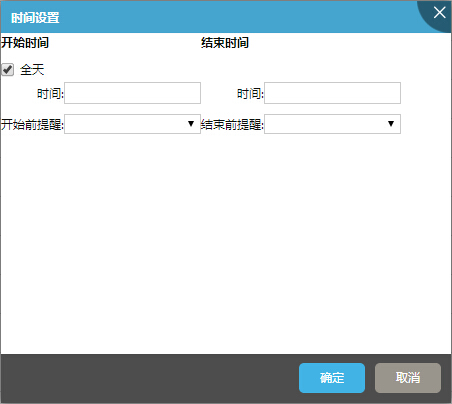
                            <body class="body-pading">
                                <div class="font_size12 form_area">
                                    <table class="" cellpadding="0" width="400" cellspacing="0">
                                        <tr>
                                            <td colspan="2" class="font_bold">开始时间</td>
                                            <td colspan="2" class="font_bold">结束时间</td>
                                        </tr>
                                        <tr>
                                            <td class="padding_tb_5 padding_r_5" id="start" colspan="2">
                                                <script>
                                                    $.calendar({
                                                        displayArea:'start_time',
                                                        flat:'start',
                                                        returnValue: true,
                                                        date:new Date(),
                                                        onUpdate:showStart,
                                                        ifFormat:"%Y-%m-%d",
                                                        daFormat:"%Y-%m-%d",
                                                        showsTime:false
                                                    });
                                                    function showStart(date){
                                                }
                                                </script>
                                            </td>
                                            <td class="td" id="end" colspan="2">
                                                <script>
                                                    $.calendar({
                                                        //position:[500,200],
                                                        flat:'end',
                                                        returnValue: true,
                                                        date:new Date(),
                                                        onUpdate:showEnd,
                                                        ifFormat:"%Y-%m-%d",
                                                        daFormat:"%Y-%m-%d",
                                                        showsTime:false
                                                    });
                                                    function showEnd(date){
                                                }
                                                </script>
                                            </td>
                                        </tr>
                                        <tr>
                                            <td colspan="4">
                                                <div class="common_checkbox_box clearfix ">
                                                    <label class="margin_r_10 hand" for="Checkbox1">
                                                    <input id="Checkbox1" checked="checked" class="radio_com" name="option" value="0" type="checkbox">全天</label>
                                                </div>
                                        </td>
                                        <tr>
                                            <th  nowrap="nowrap">时间:</th>
                                            <td  width="50%"><div class="common_txtbox_wrap"><input id="start_time"/></div></td>
                                            <th nowrap="nowrap">时间:</th>
                                            <td width="50%"><div class="common_txtbox_wrap"><input id="end_time"/></div></td>
                                        </tr>
                                        <tr>
                                            <th  nowrap="nowrap">开始前提醒:</th>
                                            <td  width="50%">
                                                <div class="common_selectbox_wrap">
                                                    <select>
                                                        <option> </option>
                                                    </select>
                                            </div>
                                            </td>
                                            <th nowrap="nowrap">结束前提醒:</th>
                                            <td width="50%"><div class="common_selectbox_wrap">
                                                    <select>
                                                        <option> </option>
                                                    </select>
                                            </div></td>
                                        </tr>
                                    </table>
                                </div>
                            </body>
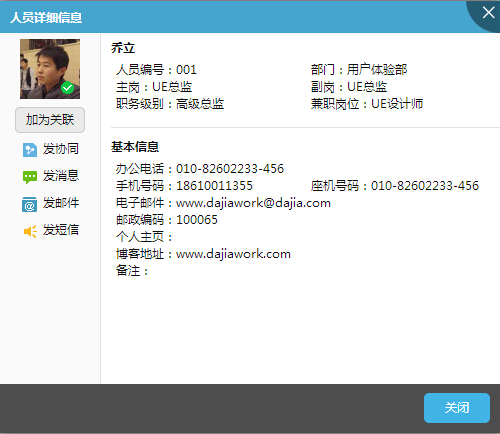
                            <body class="h100b">
                                <div class="left border_r h100b page_color" style="width:100px;">
                                    <div class=" align_center">
                                        <span class="vst relative display_inline-block  over_hidden margin_t_5">
                                            <img src="../../../skin/default/images/people.jpg" width="60" height="60">
                                            <div class="absolute current_state online"> </div>
                                        </span>
                                    </div>
                                    <div class=" align_center">
                                        <a class="common_button common_button_gray" href="javascript:void(0)">加为关联</a>
                                    </div>
                                    <ul class="font_size12 align_center card_operate">
                                        <li class="margin_t_5"><a class="img-button" href="javascript:void(0)"><em class="ico16 collaboration_16"> </em>发协同</a></li>
                                        <li class="margin_t_5"><a class="img-button" href="javascript:void(0)"><em class="ico16 communication_16"> </em>发消息</a></li>
                                        <li class="margin_t_5"><a class="img-button" href="javascript:void(0)"><em class="ico16 email_16"> </em>发邮件</a></li>
                                        <li class="margin_t_5"><a class="img-button" href="javascript:void(0)"><em class="ico16 info_16"> </em>发短信</a></li>
                                    </ul>
                                </div>
                                <div class="adapt_w font_size12 form_area people_msg  h100b" style="background:#fff;_width:370px;">
                                    <table cellpadding="0" cellspacing="0" width="100%" class="padding_5 margin_l_10">
                                        <caption class="align_left font_bold margin_t_5">乔立</caption>
                                        <tr>
                                            <td width="50%">人员编号:<span>001</span></td>
                                            <td width="50%">部门:<span>用户体验部</span></td>
                                        </tr>
                                        <tr>
                                            <td>主岗:<span>UE总监</span></td>
                                            <td>副岗:<span>UE总监</span></td>
                                        </tr>
                                        <tr>
                                            <td>职务级别:<span>高级总监</span></td>
                                            <td>兼职岗位:<span>UE设计师</span></td>
                                        </tr>
                                    </table>
                                    <table cellpadding="0" cellspacing="0" width="100%" class="padding_5 margin_l_10">
                                        <caption class="align_left font_bold border_t margin_t_10 padding_t_10">基本信息</caption>
                                        <tr>
                                            <td width="100%" colspan="2" >办公电话:<span>010-82602233-456</span></td>
                                        </tr>
                                        <tr>
                                            <td width="50%">手机号码:<span>18610011355</span></td>
                                            <td width="50%">座机号码:<span>010-82602233-456</span></td>
                                        </tr>
                                        <tr>
                                            <td colspan="2" width="100%">电子邮件:<span>www.dajiawork@dajia.com</span></td>
                                        </tr>
                                        <tr>
                                            <td colspan="2" width="100%">邮政编码:<span>100065</span></td>
                                        </tr>
                                        <tr>
                                            <td colspan="2" width="100%">个人主页:<span> </span></td>
                                        </tr>
                                        <tr>
                                            <td colspan="2" width="100%">博客地址:<span>www.dajiawork.com</span></td>
                                        </tr>
                                        <tr>
                                            <td colspan="2" width="100%">备注:<span> </span></td>
                                        </tr>
                                    </table>
                                </div>
                            </body>

                            <body class="h100b cardmini">
                                <div class="left" style="width:90px;">
                                    <div class=" align_center">
                                        <span class="people_img relative display_inline-block  over_hidden margin_t_5">
                                            <img src="../../../skin/default/images/people.jpg" width="70" height="70">
                                            <div class="absolute current_state online"> </div>
                                        </span>
                                    </div>
                                    <div class=" align_center">
                                        <a class="common_button common_button_gray" href="javascript:void(0)">加为关联</a>
                                    </div>
                                </div>
                                <div class="adapt_w font_size12 form_area people_msg" style="_width:240px;">
                                    <table cellpadding="0" cellspacing="0" width="100%" class="padding_5 margin_l_10">
                                        <caption class="align_left font_bold margin_5 font_size14" >乔立</caption>
                                        <tr>
                                            <td width="100%" colspan="2" class="font_bold"style="font-size:14px;">用户体验部UE总监</td>
                                        </tr>
                                        <tr>
                                            <th nowrap="nowrap">电话:</th><td width="100%">010-82602233-456</td>

                                        </tr>
                                        <tr>
                                            <th nowrap="nowrap">手机:</th><td>18610011355</td>

                                        </tr>
                                        <tr>
                                            <th nowrap="nowrap">邮箱:</th><td>www.dajiawork@dajia.com</td>

                                        </tr>
                                    </table>
                                </div>
                                <ul class="font_size12 align_center card_operate border_t clear">
                                    <li class="margin_t_5 left" class="left"><a class="img-button" href="javascript:void(0)"><em class="ico16 collaboration_16"> </em>发协同</a></li>
                                    <li class="margin_t_5 left"><a class="img-button" href="javascript:void(0)"><em class="ico16 communication_16"> </em>发消息</a></li>
                                    <li class="margin_t_5 left"><a class="img-button" href="javascript:void(0)"><em class="ico16 email_16"> </em>发邮件</a></li>
                                    <li class="margin_t_5 left"><a class="img-button" href="javascript:void(0)"><em class="ico16 info_16"> </em>发短信</a></li>
                                </ul>
                            </body>
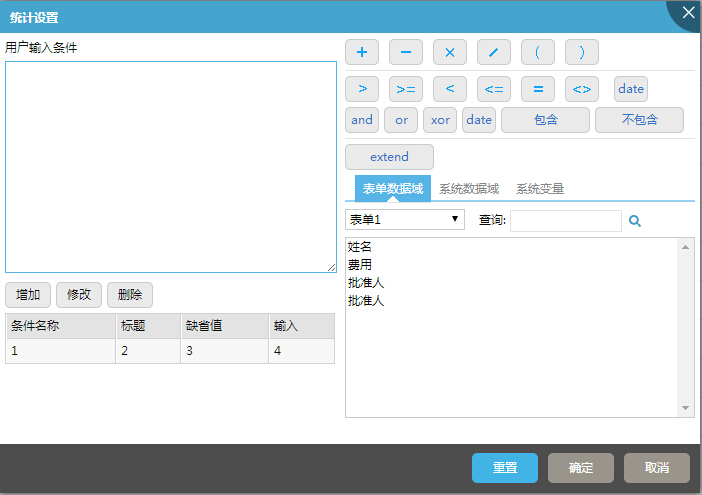
                            <style>
                                .fixed_width{width:50%;}
                            </style>
                            <body>
                                <div class="right fixed_width margin_lr_5">
                                    <p class="border_b padding_tb_5 margin_b_5">
                                        <a class="form_btn" href="javascript:void(0)"><span class="plus_16"> </span> </a>
                                        <a class="form_btn" href="javascript:void(0)"><span class="minus_16"> </span> </a>
                                        <a class="form_btn" href="javascript:void(0)"><span class="multiply_16"> </span> </a>
                                        <a class="form_btn" href="javascript:void(0)"><span class="divide_16"> </span> </a>
                                        <a class="form_btn" href="javascript:void(0)"><span class="brackl_16"> </span> </a>
                                        <a class="form_btn" href="javascript:void(0)"><span class="brackr_16"> </span> </a>

                                    </p>
                                    <p class="margin_b_5">
                                        <a class="form_btn" href="javascript:void(0)"><span class="gt_16"> </span> </a>
                                        <a class="form_btn" href="javascript:void(0)"><span class="gt_eq_16 w32 "> </span> </a>
                                        <a class="form_btn" href="javascript:void(0)"><span class="lt_16"> </span> </a>
                                        <a class="form_btn" href="javascript:void(0)"><span class="lt_eq_16 w32"> </span> </a>
                                        <a class="form_btn" href="javascript:void(0)"><span class="equal_16"> </span> </a>
                                        <a class="form_btn" href="javascript:void(0)"><span class="brack_angle_16 w32"> </span> </a>
                                        <a class="form_btn" href="javascript:void(0)">date</a>
                                    </p>
                                    <p class="border_b padding_b_5 margin_b_5">
                                        <a class="form_btn" href="javascript:void(0)">and</a>
                                        <a class="form_btn" href="javascript:void(0)">or</a>
                                        <a class="form_btn" href="javascript:void(0)">xor</a>
                                        <a class="form_btn" href="javascript:void(0)">date</a>
                                        <a class="form_btn w89" href="javascript:void(0)">包含</a>
                                        <a class="form_btn w89" href="javascript:void(0)">不包含</a>
                                    </p>
                                    <p class="margin_b_5">
                                        <a class="form_btn w89" href="javascript:void(0)">extend</a>
                                    </p>
                                    <div class="common_tabs clearfix">
                                        <ul class="left">
                                            <li class="current"><a hideFocus="true" class="border_b" href="javascript:void(0)">表单数据域</a></li>
                                            <li><a hideFocus="true" href="javascript:void(0)">系统数据域</a></li>
                                            <li><a hideFocus="true" class="last_tab" href="javascript:void(0)">系统变量</a></li>
                                        </ul>
                                    </div>
                                    <div class="margin_t_5 font_size12">
                                        <select style="width:120px;"><option> 表单1</option></select>
                                        <label for="name" class="margin_l_10">查询: </label><input class="comp" name="name" value="" type="text" comp="type:'search',fun:'testFunction',title:'查询'">
                                        <br>
                                        <select multiple="true" class="w100b margin_t_5" size="10">
                                            <option>姓名</option>
                                            <option>费用</option>
                                            <option>批准人</option>
                                            <option>批准人</option>
                                        </select>
                                    </div>

                              </div>
                              <div class="adapt_w padding_5">
                                <p class="font_size12 margin_b_5">用户输入条件</p>
                                <textarea class="w100b" rows="10"> </textarea>
                                <div class="margin_tb_5">
                                    <a class="common_button common_button_gray" href="javascript:void(0)">增加</a>
                                    <a class="common_button common_button_gray" href="javascript:void(0)">修改</a>
                                    <a class="common_button common_button_gray" href="javascript:void(0)">删除</a>
                                </div>
                                <table class="only_table" border="0" cellSpacing="0" cellPadding="0" width="100%">
                                    <thead>
                                        <tr>
                                            <th>条件名称</th>
                                            <th>标题</th>
                                            <th>缺省值</th>
                                            <th>输入</th>
                                        </tr>
                                    </thead>
                                    <tbody>
                                        <tr class="erow">
                                            <td>1</td>
                                            <td>2</td>
                                            <td>3</td>
                                            <td>4</td>
                                        </tr>
                                    </tbody>
                                </table>
                              </div>
                            </body>











